

Send Transaction
Sign and submit a transaction to the Stellar network using Blux.
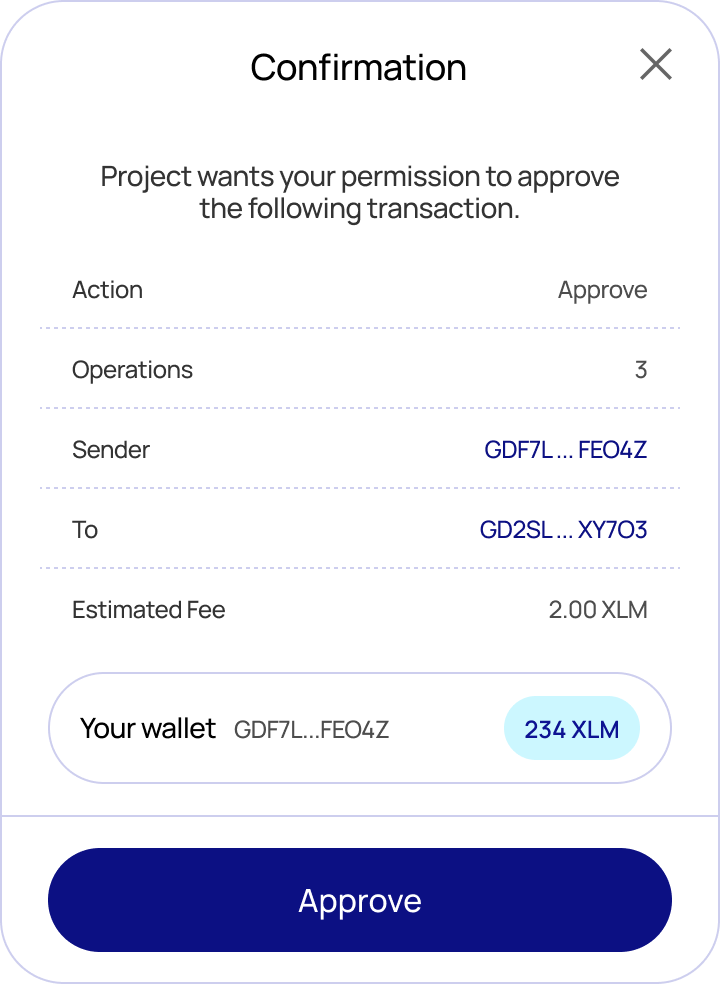
The blux.sendTransaction() method signs a transaction with the connected wallet and submits it to the network. By default Blux shows a confirmation modal displaying the transaction details, estimated fee, and the submitting account before the user approves.
If you only want to sign a transaction without submitting it, use signTransaction instead.
Auto-detected transaction type
sendTransaction inspects the transaction and handles each type correctly — you don't choose the path:
- Classic transactions (payments, trustlines, offers, account operations, path payments, …) are submitted to Horizon and confirmed immediately.
- Soroban transactions (smart-contract calls —
invokeHostFunction,extendFootprintTtl,restoreFootprint) are submitted via Soroban RPC and then polled until the network finalizes them (typically a few seconds). The value the contract function returned is decoded and made available on the result.
Because of this there is no separate waitForTransaction: classic transactions don't need waiting, and Soroban transactions are waited on for you.
Type
type IOptions = {
  // Network passphrase to sign/submit against. Defaults to the active network.
  // Use the `networks` map, e.g. networks.testnet / networks.mainnet.
  network?: string;
};

const sendTransaction: (
  xdr: string,
  options?: IOptions,
) => Promise<ISubmittedTransaction>;| Parameter | Type | Description |
|---|---|---|
xdr | string | Base64-encoded XDR string of the transaction |
options.network | string | Network to submit on — omit to use the active network |
Return value
interface ISubmittedTransaction {
  // The transaction hash.
  hash: string;

  // Resolves to the value the invoked contract function returned, decoded to a
  // native JS value. Resolves to `null` for classic transactions and for
  // Soroban calls whose function returns nothing (void). Always a promise.
  returnValue: () => Promise<unknown | null>;

  // The underlying response object, for advanced use:
  //  - classic: Horizon SubmitTransactionResponse
  //  - soroban: the finalized Soroban RPC transaction (GetSuccessfulTransactionResponse)
  raw: SubmitTransactionResponse | GetSuccessfulTransactionResponse;
}
Migration note: the resolved value is now the ISubmittedTransaction envelope. result.hash works for both types as before, but classic callers who previously read Horizon fields directly off the result (e.g. result.ledger, result.successful) should now read them from result.raw.
Usage — classic payment
import { blux, getAccount, networks, StellarSdk } from "@bluxcc/core";

const { TransactionBuilder, Operation, Asset, BASE_FEE } = StellarSdk;

// 1. Build an unsigned transaction (a 10 XLM payment).
const source = await getAccount({}); // the logged-in account, on the active network
if (!source) throw new Error("Account not found");

const tx = new TransactionBuilder(source, {
  fee: BASE_FEE,
  networkPassphrase: networks.testnet,
})
  .addOperation(
    Operation.payment({
      destination: "GDESTINATION...ADDRESS",
      asset: Asset.native(),
      amount: "10",
    }),
  )
  .setTimeout(180)
  .build();

// 2. Sign + submit via the connected wallet.
const result = await blux.sendTransaction(tx.toXDR(), {
  network: networks.testnet,
});

console.log(result.hash);                // e.g. "a1b2c3..."
console.log(await result.returnValue()); // null — classic txs have no return value
console.log(result.raw.successful);      // Horizon fields live under `.raw`
Usage — Soroban contract call
The easiest way to call a contract is writeContract, which builds, simulates, assembles, signs, submits, and waits — returning the same ISubmittedTransaction:
import { writeContract, networks } from "@bluxcc/core";

const result = await writeContract(
  {
    address: "CCONTRACT...ADDRESS",
    fn: "increment",
    args: [5],
  },
  { network: networks.testnet },
);

console.log(result.hash);
const newCount = await result.returnValue(); // the contract's return value, decoded (e.g. 5)
If you build and assemble the contract transaction yourself, sendTransaction still detects it's a Soroban transaction, submits via RPC, waits for finalization, and exposes the return value:
const result = await blux.sendTransaction(assembledContractXdr, {
  network: networks.testnet,
});
const value = await result.returnValue();
Errors
sendTransaction rejects with BLUX:-prefixed messages:
| Message | Cause |
|---|---|
BLUX: User is not authenticated. | No user is logged in. |
BLUX: Blux modal is open elsewhere. | Another Blux flow is already open. |
BLUX: Invalid XDR | The XDR can't be parsed for the given network. |
BLUX: Could not find the connected wallet. | The connected wallet couldn't be resolved. |
BLUX: Failed to submit transaction: … | RPC rejected the transaction (ERROR). |
BLUX: The network is busy, please resubmit the transaction. | RPC returned TRY_AGAIN_LATER. |
BLUX: Transaction <hash> failed on-chain. | Submitted but failed during execution. |
BLUX: Timed out waiting for transaction <hash> to finalize. | Not finalized within ~30s. |
To skip the confirmation modal and handle your own confirmation UI, set showWalletUIs: false in createConfig. Signing and submission then happen headlessly — the resolved value is identical either way.