Send Transaction
Sign and submit Stellar transactions from your React app using the Blux SDK.
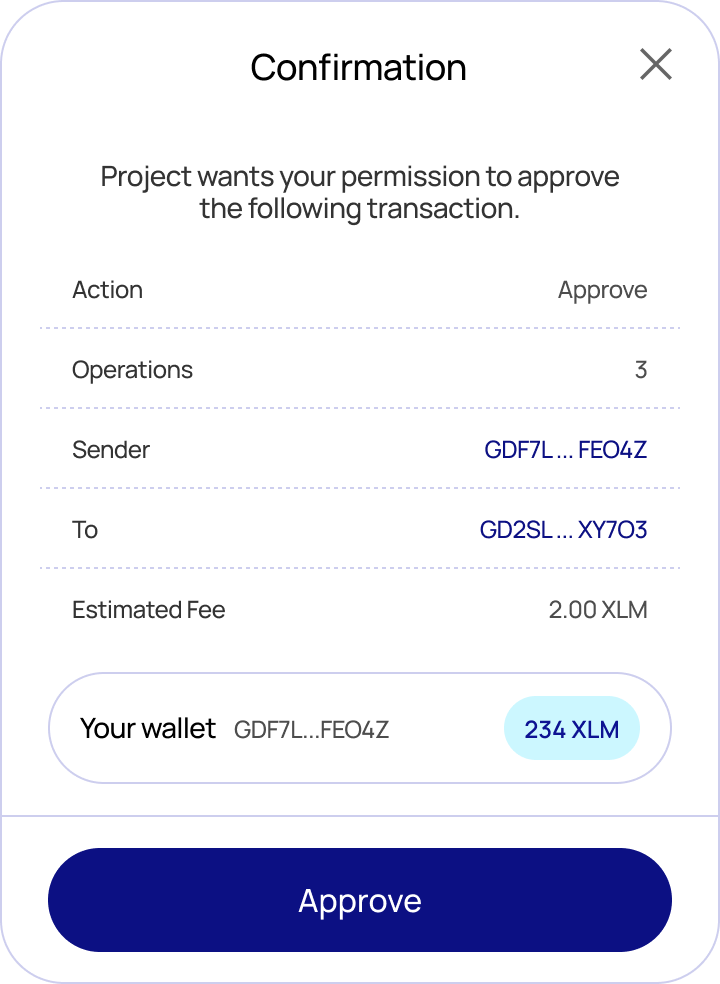
Use the sendTransaction function from the useBlux hook to sign a transaction with the connected wallet and submit it to the network. By default Blux shows a confirmation modal displaying the transaction details, estimated fee, and submitting account before the user approves.
If you only want to sign a transaction without submitting it, use signTransaction instead.
Import
import { useBlux } from "@bluxcc/react";Auto-detected transaction type
sendTransaction inspects the transaction and handles each type correctly — you don't choose the path:
- Classic transactions (payments, trustlines, offers, account operations, path payments, …) are submitted to Horizon and confirmed immediately.
- Soroban transactions (smart-contract calls) are submitted via Soroban RPC and then polled until the network finalizes them (typically a few seconds). The value the contract function returned is decoded and made available on the result.
There is no separate waitForTransaction: classic transactions don't need waiting, and Soroban transactions are waited on for you.
Type
type IOptions = {
  // Network passphrase to sign/submit against. Defaults to the active network.
  network?: string;
};

const sendTransaction: (
  xdr: string,
  options?: IOptions,
) => Promise<ISubmittedTransaction>;| Parameter | Type | Description |
|---|---|---|
xdr | string | Base64-encoded XDR string of the transaction |
options.network | string | Network to submit on — omit to use the active network |
Return value
interface ISubmittedTransaction {
  // The transaction hash.
  hash: string;

  // Resolves to the value the invoked contract function returned, decoded to a
  // native JS value. Resolves to `null` for classic transactions and for
  // Soroban calls whose function returns nothing (void). Always a promise.
  returnValue: () => Promise<unknown | null>;

  // The underlying response object, for advanced use:
  //  - classic: Horizon SubmitTransactionResponse
  //  - soroban: the finalized Soroban RPC transaction (GetSuccessfulTransactionResponse)
  raw: SubmitTransactionResponse | GetSuccessfulTransactionResponse;
}
Migration note: the resolved value is now the ISubmittedTransaction envelope, and the isSoroban option has been removed — the type is detected for you. result.hash works for both types; classic callers who previously read Horizon fields directly off the result (e.g. result.ledger, result.successful) should now read them from result.raw.
Usage
import { useBlux } from "@bluxcc/react";

function SendButton({ xdr }: { xdr: string }) {
  const { sendTransaction } = useBlux();

  const sendTx = async () => {
    try {
      const result = await sendTransaction(xdr);

      console.log(result.hash);
      console.log(await result.returnValue()); // null for classic txs
    } catch (error) {
      console.error("Something went wrong!", error);
    }
  };

  return <button onClick={sendTx}>Send</button>;
}
For Soroban contract calls, prefer the useWriteContract hook, which builds, simulates, assembles, signs, submits, and waits — resolving to the same ISubmittedTransaction.
Errors
sendTransaction rejects with BLUX:-prefixed messages:
| Message | Cause |
|---|---|
BLUX: User is not authenticated. | No user is logged in. |
BLUX: Blux modal is open elsewhere. | Another Blux flow is already open. |
BLUX: Invalid XDR | The XDR can't be parsed for the given network. |
BLUX: Could not find the connected wallet. | The connected wallet couldn't be resolved. |
BLUX: Failed to submit transaction: … | RPC rejected the transaction (ERROR). |
BLUX: The network is busy, please resubmit the transaction. | RPC returned TRY_AGAIN_LATER. |
BLUX: Transaction <hash> failed on-chain. | Submitted but failed during execution. |
BLUX: Timed out waiting for transaction <hash> to finalize. | Not finalized within ~30s. |
To skip the confirmation modal and build your own flow, set showWalletUIs: false in your BluxProvider configuration. The resolved value is identical either way.
Screenshots