# Send Transaction
URL: https://docs.blux.cc/javascript/usage/send-transaction
Sign and submit a transaction to the Stellar network using Blux.
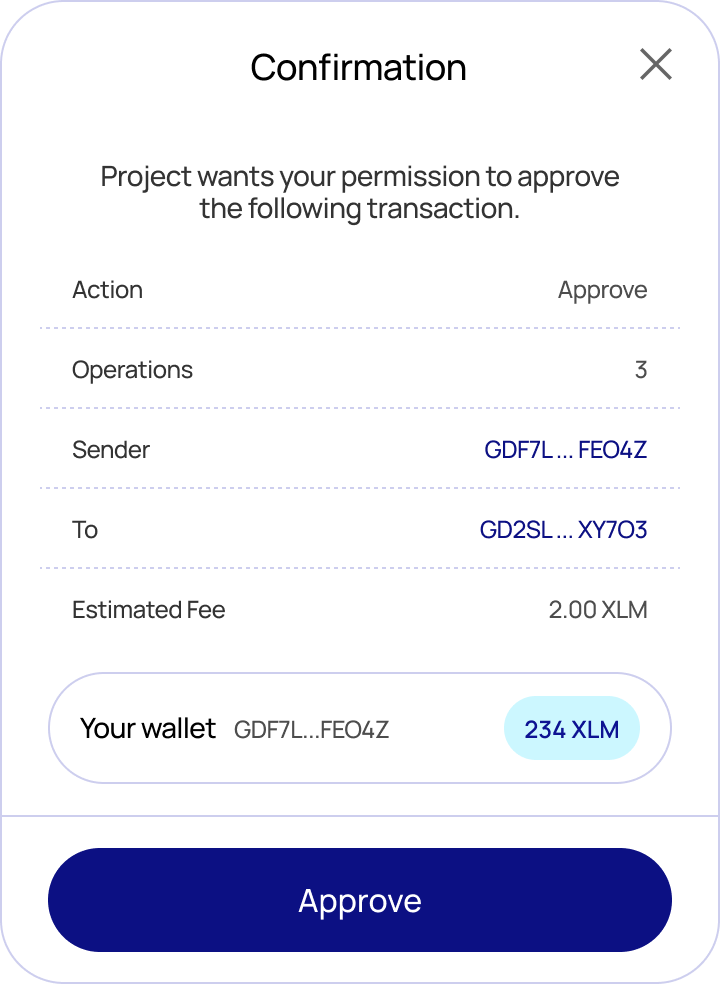
The `blux.sendTransaction()` method **signs** a transaction with the connected wallet and **submits** it to the network. By default Blux shows a confirmation modal displaying the transaction details, estimated fee, and the submitting account before the user approves.
If you only want to sign a transaction without submitting it, use [`signTransaction`](/javascript/usage/sign-transaction) instead.
 ## Auto-detected transaction type
`sendTransaction` inspects the transaction and handles each type correctly — you don't choose the path:
- **Classic transactions** (payments, trustlines, offers, account operations, path payments, …) are submitted to Horizon and confirmed immediately.
- **Soroban transactions** (smart-contract calls — `invokeHostFunction`, `extendFootprintTtl`, `restoreFootprint`) are submitted via Soroban RPC and then polled until the network finalizes them (typically a few seconds). The value the contract function returned is decoded and made available on the result.
Because of this there is no separate `waitForTransaction`: classic transactions don't need waiting, and Soroban transactions are waited on for you.
## Type
```typescript
type IOptions = {
// Network passphrase to sign/submit against. Defaults to the active network.
// Use the `networks` map, e.g. networks.testnet / networks.mainnet.
network?: string;
};
const sendTransaction: (
xdr: string,
options?: IOptions,
) => Promise;
```
| Parameter | Type | Description |
|---|---|---|
| `xdr` | `string` | Base64-encoded XDR string of the transaction |
| `options.network` | `string` | Network to submit on — omit to use the active network |
### Return value
```typescript
interface ISubmittedTransaction {
// The transaction hash.
hash: string;
// Resolves to the value the invoked contract function returned, decoded to a
// native JS value. Resolves to `null` for classic transactions and for
// Soroban calls whose function returns nothing (void). Always a promise.
returnValue: () => Promise;
// The underlying response object, for advanced use:
// - classic: Horizon SubmitTransactionResponse
// - soroban: the finalized Soroban RPC transaction (GetSuccessfulTransactionResponse)
raw: SubmitTransactionResponse | GetSuccessfulTransactionResponse;
}
```
**Migration note:** the resolved value is now the `ISubmittedTransaction` envelope. `result.hash` works for both types as before, but classic callers who previously read Horizon fields directly off the result (e.g. `result.ledger`, `result.successful`) should now read them from `result.raw`.
## Usage — classic payment
```typescript
const { TransactionBuilder, Operation, Asset, BASE_FEE } = StellarSdk;
// 1. Build an unsigned transaction (a 10 XLM payment).
const source = await getAccount({}); // the logged-in account, on the active network
if (!source) throw new Error("Account not found");
const tx = new TransactionBuilder(source, {
fee: BASE_FEE,
networkPassphrase: networks.testnet,
})
.addOperation(
Operation.payment({
destination: "GDESTINATION...ADDRESS",
asset: Asset.native(),
amount: "10",
}),
)
.setTimeout(180)
.build();
// 2. Sign + submit via the connected wallet.
const result = await blux.sendTransaction(tx.toXDR(), {
network: networks.testnet,
});
console.log(result.hash); // e.g. "a1b2c3..."
console.log(await result.returnValue()); // null — classic txs have no return value
console.log(result.raw.successful); // Horizon fields live under `.raw`
```
## Usage — Soroban contract call
The easiest way to call a contract is [`writeContract`](/javascript/core/writeContract), which builds, simulates, assembles, signs, submits, and waits — returning the same `ISubmittedTransaction`:
```typescript
const result = await writeContract(
{
address: "CCONTRACT...ADDRESS",
fn: "increment",
args: [5],
},
{ network: networks.testnet },
);
console.log(result.hash);
const newCount = await result.returnValue(); // the contract's return value, decoded (e.g. 5)
```
If you build and assemble the contract transaction yourself, `sendTransaction` still detects it's a Soroban transaction, submits via RPC, waits for finalization, and exposes the return value:
```typescript
const result = await blux.sendTransaction(assembledContractXdr, {
network: networks.testnet,
});
const value = await result.returnValue();
```
## Errors
`sendTransaction` rejects with `BLUX:`-prefixed messages:
| Message | Cause |
|---|---|
| `BLUX: User is not authenticated.` | No user is logged in. |
| `BLUX: Blux modal is open elsewhere.` | Another Blux flow is already open. |
| `BLUX: Invalid XDR` | The XDR can't be parsed for the given network. |
| `BLUX: Could not find the connected wallet.` | The connected wallet couldn't be resolved. |
| `BLUX: Failed to submit transaction: …` | RPC rejected the transaction (`ERROR`). |
| `BLUX: The network is busy, please resubmit the transaction.` | RPC returned `TRY_AGAIN_LATER`. |
| `BLUX: Transaction failed on-chain.` | Submitted but failed during execution. |
| `BLUX: Timed out waiting for transaction to finalize.` | Not finalized within ~30s. |
To skip the confirmation modal and handle your own confirmation UI, set `showWalletUIs: false` in `createConfig`. Signing and submission then happen headlessly — the resolved value is identical either way.
## Auto-detected transaction type
`sendTransaction` inspects the transaction and handles each type correctly — you don't choose the path:
- **Classic transactions** (payments, trustlines, offers, account operations, path payments, …) are submitted to Horizon and confirmed immediately.
- **Soroban transactions** (smart-contract calls — `invokeHostFunction`, `extendFootprintTtl`, `restoreFootprint`) are submitted via Soroban RPC and then polled until the network finalizes them (typically a few seconds). The value the contract function returned is decoded and made available on the result.
Because of this there is no separate `waitForTransaction`: classic transactions don't need waiting, and Soroban transactions are waited on for you.
## Type
```typescript
type IOptions = {
// Network passphrase to sign/submit against. Defaults to the active network.
// Use the `networks` map, e.g. networks.testnet / networks.mainnet.
network?: string;
};
const sendTransaction: (
xdr: string,
options?: IOptions,
) => Promise;
```
| Parameter | Type | Description |
|---|---|---|
| `xdr` | `string` | Base64-encoded XDR string of the transaction |
| `options.network` | `string` | Network to submit on — omit to use the active network |
### Return value
```typescript
interface ISubmittedTransaction {
// The transaction hash.
hash: string;
// Resolves to the value the invoked contract function returned, decoded to a
// native JS value. Resolves to `null` for classic transactions and for
// Soroban calls whose function returns nothing (void). Always a promise.
returnValue: () => Promise;
// The underlying response object, for advanced use:
// - classic: Horizon SubmitTransactionResponse
// - soroban: the finalized Soroban RPC transaction (GetSuccessfulTransactionResponse)
raw: SubmitTransactionResponse | GetSuccessfulTransactionResponse;
}
```
**Migration note:** the resolved value is now the `ISubmittedTransaction` envelope. `result.hash` works for both types as before, but classic callers who previously read Horizon fields directly off the result (e.g. `result.ledger`, `result.successful`) should now read them from `result.raw`.
## Usage — classic payment
```typescript
const { TransactionBuilder, Operation, Asset, BASE_FEE } = StellarSdk;
// 1. Build an unsigned transaction (a 10 XLM payment).
const source = await getAccount({}); // the logged-in account, on the active network
if (!source) throw new Error("Account not found");
const tx = new TransactionBuilder(source, {
fee: BASE_FEE,
networkPassphrase: networks.testnet,
})
.addOperation(
Operation.payment({
destination: "GDESTINATION...ADDRESS",
asset: Asset.native(),
amount: "10",
}),
)
.setTimeout(180)
.build();
// 2. Sign + submit via the connected wallet.
const result = await blux.sendTransaction(tx.toXDR(), {
network: networks.testnet,
});
console.log(result.hash); // e.g. "a1b2c3..."
console.log(await result.returnValue()); // null — classic txs have no return value
console.log(result.raw.successful); // Horizon fields live under `.raw`
```
## Usage — Soroban contract call
The easiest way to call a contract is [`writeContract`](/javascript/core/writeContract), which builds, simulates, assembles, signs, submits, and waits — returning the same `ISubmittedTransaction`:
```typescript
const result = await writeContract(
{
address: "CCONTRACT...ADDRESS",
fn: "increment",
args: [5],
},
{ network: networks.testnet },
);
console.log(result.hash);
const newCount = await result.returnValue(); // the contract's return value, decoded (e.g. 5)
```
If you build and assemble the contract transaction yourself, `sendTransaction` still detects it's a Soroban transaction, submits via RPC, waits for finalization, and exposes the return value:
```typescript
const result = await blux.sendTransaction(assembledContractXdr, {
network: networks.testnet,
});
const value = await result.returnValue();
```
## Errors
`sendTransaction` rejects with `BLUX:`-prefixed messages:
| Message | Cause |
|---|---|
| `BLUX: User is not authenticated.` | No user is logged in. |
| `BLUX: Blux modal is open elsewhere.` | Another Blux flow is already open. |
| `BLUX: Invalid XDR` | The XDR can't be parsed for the given network. |
| `BLUX: Could not find the connected wallet.` | The connected wallet couldn't be resolved. |
| `BLUX: Failed to submit transaction: …` | RPC rejected the transaction (`ERROR`). |
| `BLUX: The network is busy, please resubmit the transaction.` | RPC returned `TRY_AGAIN_LATER`. |
| `BLUX: Transaction failed on-chain.` | Submitted but failed during execution. |
| `BLUX: Timed out waiting for transaction to finalize.` | Not finalized within ~30s. |
To skip the confirmation modal and handle your own confirmation UI, set `showWalletUIs: false` in `createConfig`. Signing and submission then happen headlessly — the resolved value is identical either way.